Displaying a hit document
In the hit list, you see a part of the document that applies to your search request. You can display the document in a preview or in the original format. You can display additional data for the document.
To display the document itself, click on the heading or the file path. Alternatively, open the menu and click Open. Depending on the browser and the settings, the document is downloaded or opened in its original format, e.g., as a website in the browser or in a PDF viewer. If it is an attachment to an e-mail, the original e-mail is opened, from which the attachment can also be accessed.
To show data for the document, open the menu and click on Details. The data is displayed in a new window.
To show the preview in the separate window, click on the thumbnail. For ZIP files, an overview of the contained files is displayed. For e-mail attachments, the parent e-mail is displayed.
If a file type icon is displayed instead of the thumbnail, the preview is not or not yet available.
In the preview, you can scroll from hit page to hit page, scroll through the document, change the display size and rotate the document.
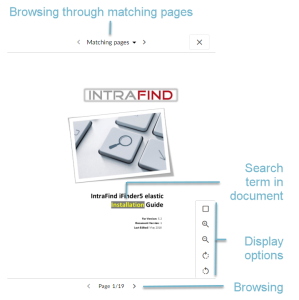
Document with selected hits in the preview
The display settings apply only for the currently displayed page. When you leave the page, the display settings are reset.
Show complete page
Zoom in or zoom out 

Rotate clockwise or counterclockwise
